
Secure SMS using Private Box
Using GO SMS you can easily secure text messages of selected contacts and hide them from the prying eyes of people around you. Private box is a feature of GO SMS Pro that encrypts selected SMS using a password. We have already discussed how you can set up private box on Android in the past. So let’s keep rolling and see the rest of the features.
Schedule SMS
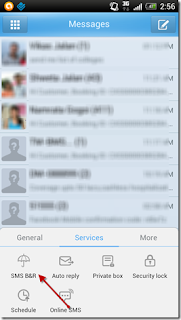
If were to ask me the one feature I miss the most on the stock Android messaging app, it would be the power to schedule an SMS. Suppose you want to wish your friend on his birthday at midnight, or you might want to send a periodic reminder to someone. The facility to schedule an SMS can really come in handy in such situations. To schedule one on GO SMS, pull up the menu and select Schedule from the Services tab. Again select New Schedule from the menu.


Using GO SMS you can easily secure text messages of selected contacts and hide them from the prying eyes of people around you. Private box is a feature of GO SMS Pro that encrypts selected SMS using a password. We have already discussed how you can set up private box on Android in the past. So let’s keep rolling and see the rest of the features.
Schedule SMS
If were to ask me the one feature I miss the most on the stock Android messaging app, it would be the power to schedule an SMS. Suppose you want to wish your friend on his birthday at midnight, or you might want to send a periodic reminder to someone. The facility to schedule an SMS can really come in handy in such situations. To schedule one on GO SMS, pull up the menu and select Schedule from the Services tab. Again select New Schedule from the menu.


You must now compose the SMS, provide the contact information and set the future date and time you want to send the SMS at. If you want to make the SMS periodic, click on the Repetition dropdown menu and select the type of repetition you want. Once you have done all that, click on the commit button to save the settings.
The message will be sent out at the specific date and time automatically.
Backup and Restore SMS
Though there are many Android and PC applications to backup and restore messages, GO SMS just integrates it right to your inbox. Why use individual apps, one to read SMS and other to back them up when you can do all of them under the same roof?
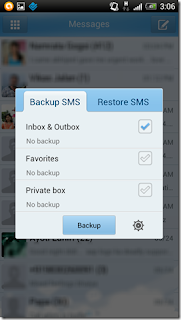
To create a backup using GO SMS, open the Services tab again but select SMS B&R (Backup and Restore) this time. Put a check on the type of backup you want to take. To configure additional backup settings, press the settings button right next to the backup button. Once you have configured that, press the Backup button. You can also forward the file to your email.
Black List SMS
SMS or a text message is a great way to communicate when you have to convey a short message to someone really quick. But sometimes they can be irritating as hell. Many telemarketing companies have nothing else to do but to spam inboxes with promotional stuff most of the people really don’t care about.
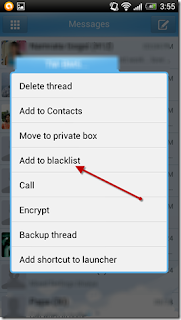
GO SMS gives you peace of mind by automatically hiding these SMS alerts as well as the messages from the inbox. If you already have the SMS in your inbox you want to blacklist, long press on the message thread and select Add to blacklist.
