Viber

Follow Us

Showing posts with label Wechat. Show all posts

1
Open WeChat and touch Contacts. If you let WeChat look at your contacts list, WeChat will use that information to search for other WeChat users you might know.

2
Touch Recommended Friends.

3
Touch Add next to anyone you want to add. These contacts will be added to your list of friends.

4
To find friends using their phone number, touch + in the top right corner.

5
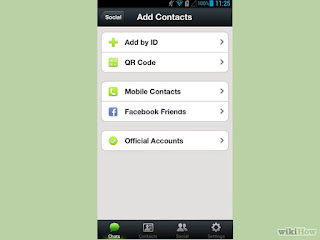
Touch Add Friends.
6
In the search field, type the phone number of a friend who you know has WeChat. You can also search by WeChat ID.
  • The WeChat ID is the name you typed in the Full Name field when you created a WeChat account.
  • You can also search for users by QQ ID, which is the most popular messaging app in China, but unless you have friends in China, this probably won’t be useful to you.

           You can install in Google Play                 

1
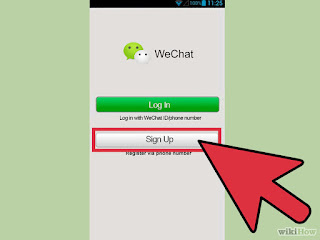
Register an account. Open WeChat. Touch the Sign Up button. On the Sign Up screen, choose the region you live in, and then, in the Mobile number field, type your mobile phone number. Touch Sign Up. When it asks you to confirm your number, check your number, and then touch Confirm.

2
Verify the account. WeChat will send you a text message with a four digit verification code. In the Enter code field, type the verification code, and then touch Submit.
  • If you didn’t get a verification code, touch No verification code received?, and then touch Resend to get another text message or touch Phone Call to get an automated phone call with the verification code.
  • According to the WeChat Terms of Service, you need to be at least 13 years old and have your parents permission to use WeChat.
3
Set Up a WeChat Profile. On the Setup Profile screen, in the Full Name field, type a name.
  • On this screen, you can also choose a photo for your account. This is optional.
  • You can type whatever name you want to use in the Full Name field.
4
Find your friends on WeChat. On the Find Friends screen, WeChat will ask you if you want to Find WeChat Friends. If you agree to this, WeChat will upload the names, phone numbers, and email addresses in your phone to the WeChat servers in order to find your friends using WeChat.[3]
  • Touch Learn more to learn more about how WeChat will use your friends’ contact information.
  • If you choose not to do this now, you can always do it later. If you choose not to do this, you can add friends manually.

You can install in Google Play


Resource by : wikihow

WeChat is a free messaging alternative to cellular text messages. WeChat supports sending text, photos, videos, and more. WeChat is available on iOS, Android, Windows Phone, Nokia S40, Symbian, and Blackberry phones. It’s also available on Mac OS X

GUIDE APP ANDROID

TIPS GUIDE GAME APP

TRICK GUIDE APP ANDORID